

LinkedIn Sales Navigator Review for B2B Teams
LinkedIn Sales Navigator review for B2B sales leaders weighing its prospecting filters, CRM sync, contact-data limits, pricing, and team fit.
This LinkedIn Sales Navigator review starts with the facts buyers care about: Sales Navigator provides access to 1B+ professional profiles, has 40+ advanced search filters, and carries an annual starting monthly price of $79.99.
For B2B sales teams, it is a foundational prospecting layer. LinkedIn has the professional graph your reps already use to understand companies, identify decision-makers, and spot job changes before a prospect fills out a form.
The catch sits outside the product. Sales Navigator helps a team find the right people and keep an eye on their accounts. It excludes direct email addresses, phone numbers, and outbound sequencing. Most serious teams pair it with a contact-data provider and an engagement platform.
That division of labor can feel annoying when you are staring at another SaaS bill. It also reflects how prospecting works. LinkedIn is strongest when the question is, “Who should we pursue?” A data provider answers, “How do we reach them?” A sequencing tool answers, “What happens after the first touch?”
LinkedIn Sales Navigator Review Verdict
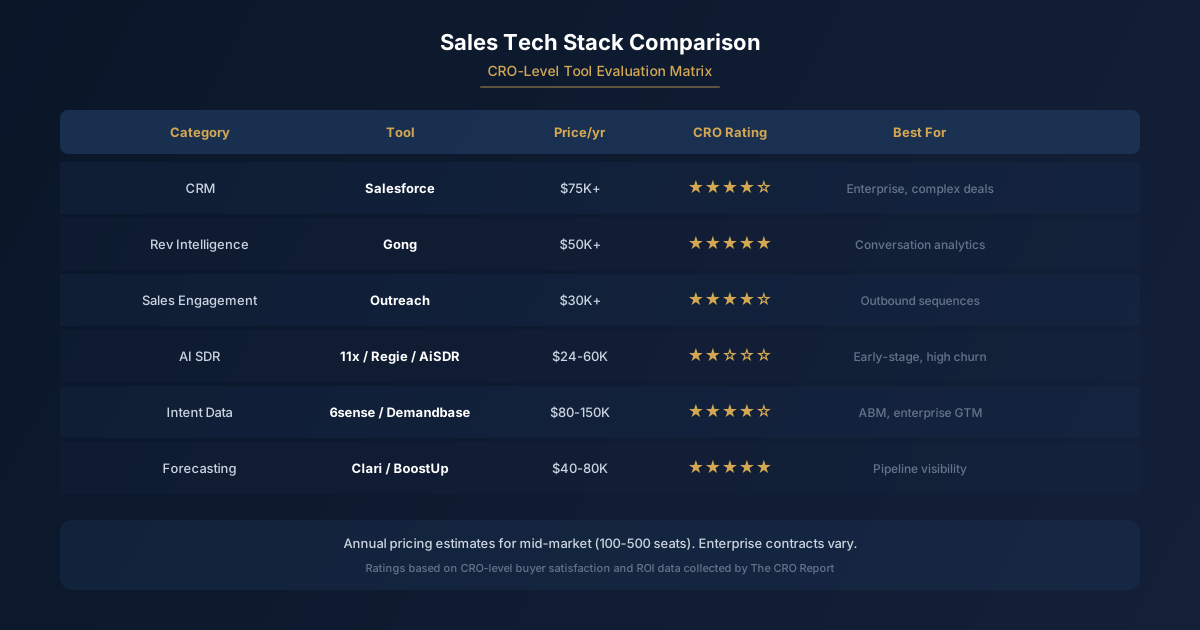
Sales Navigator is worth buying when your team sells to named accounts, cares about organizational change, and needs better prospect research than a generic company database can provide.
Its core advantage is the source material. LinkedIn sits where professionals update titles, employers, promotions, hiring activity, and career moves. LinkedIn revenue is listed as $17.81B for FY2025, which gives some sense of the scale behind the network and the commercial importance Microsoft places on it.
A rep can use that information to build a sharper account view. Which leaders have joined recently? Which department is hiring? Who shares a connection with someone on the team? Which accounts show enough movement to deserve attention now?
That is a much better starting point than dumping a giant list into a sequence and hoping volume compensates for weak targeting. It also makes Sales Navigator more valuable to teams with a defined market than teams whose entire strategy is broad outbound.
The product loses some shine when buyers expect an all-in-one sales platform. Sales Navigator does not replace a contact database. It does not replace an email sequencer. It does not replace a CRM, either. It makes the research and prioritization work in front of those systems much better.
Teams that already live in a CRM tend to get the most from it. A saved lead becomes part of an account plan rather than another browser tab. A job change becomes a reason to revisit an account. A recommendation becomes a possible route into a company that the rep already knows belongs in the territory.
Sales Navigator also has an advantage that is hard to replicate through static data exports. Prospecting changes when people change jobs. The person who ignored your outreach at a former company may become a more relevant buyer elsewhere. A champion can move into a new role. A closed-lost account can suddenly have a different executive team.
That is why the product works best as a living research environment. Treating it as a list-building utility leaves a lot of value on the table.
Features That Matter for Prospecting
The long feature list matters less than the workflow a rep can repeat without turning research into an all-day hobby.
Search filters are the center of the product. Sales Navigator has 40+ advanced search filters, giving reps room to narrow a market by company attributes, job function, seniority, geography, and other professional criteria.
The practical use is not to stack every filter available. Over-filtering is how a rep ends up with a tiny, misleading market and concludes there are no buyers. Start with the account profile that has produced real opportunities, then add role and seniority criteria that match the people who can move a deal forward.
A sales leader selling into larger companies might begin with account size, industry, and region. Reps can then build separate lead searches for economic buyers, operational owners, and internal champions. Each role needs different messaging and has a different reason to care.
| Seniority tier | Prospecting role | Outreach angle |
|---|---|---|
| Executive | Budget owner or strategic sponsor | Revenue, risk, and business priority |
| Department leader | Operational buyer | Team problem and measurable outcome |
| Manager | Potential champion | Daily friction and implementation fit |
| Individual contributor | Practitioner or internal source | Workflow detail and account context |
That structure protects against a common Sales Navigator mistake: confusing a relevant title with a useful prospect. A senior person may have authority but no direct stake in the problem. A manager may have no budget but know exactly why the team needs a change. Good prospecting maps both.
Lead and account saves give the product its day-to-day usefulness. Reps can keep a watchlist of companies and contacts instead of rebuilding searches every week. Saved lists also help managers review whether reps are working the intended market or drifting toward whatever is easiest to find.
Alerts turn those lists into a source of timing signals. Promotions, job changes, company updates, and hiring activity can create an opening for a relevant message. The signal is not a permission slip for canned outreach. It is a reason to do a little homework and write something with a point.
Lead recommendations help reps expand from a known good profile. If a rep has identified a buyer at an account, suggested leads can surface adjacent stakeholders or similar people within the company. That helps most when the rep already understands the buying group and is trying to fill gaps.
InMail is useful for prospects where email data is unavailable, uncertain, or routed through a crowded inbox. It works poorly as a substitute for thoughtful outreach. A short message tied to the prospect’s role, company context, and current priorities can earn attention. A generic pitch still looks generic inside LinkedIn.
CRM sync matters because Sales Navigator research becomes more valuable when it does not die in a rep’s private workspace. Account and relationship context can support pipeline reviews, territory planning, and handoffs between sales development and account executives.
If your team uses HubSpot, [HubSpot pricing]( /tools/hubspot-pricing/) becomes easier to evaluate alongside an annual starting monthly price of $79.99. The useful question is whether the combination gives reps enough account context to work a market consistently, rather than whether each tool can claim a similar feature on a comparison page.
Relationship context is the quiet feature that can pay for the product. Shared connections, prior colleagues, and account activity give reps more routes into an organization. Warm introductions still beat anonymous outreach when the relationship is real and the request is specific.
What Sales Navigator Does Not Include
Sales Navigator excludes the contact data most outbound teams need to run multichannel outreach at scale. You will not get a complete list of verified work emails, mobile numbers, or direct dials from the product.
That is a meaningful boundary, not a minor missing feature. A rep may identify the exact person worth contacting, then need another tool to find and verify a work email. Teams that skip this step often end up with low-quality records, bounced emails, or guessed addresses that create more noise than pipeline.
A separate enrichment product fills that gap. Data enrichment tools belong beside Sales Navigator because Sales Navigator provides access to 1B+ professional profiles, while enrichment platforms focus on turning a prospect record into usable contact information.
The product also excludes outbound sequencing. It does not run email cadences, schedule follow-ups, handle call tasks, or coordinate the full rhythm of a sales-development program. Sales Navigator can surface the person and the reason to reach out. Your engagement platform has to carry the conversation.
That separation affects process design. Reps should not research in Sales Navigator, manually copy a random batch of profiles elsewhere, and forget why each account made the list. Capture the account hypothesis, the relevant contact, and the trigger before moving records into the enrichment and sequencing workflow.
The best teams keep the handoff simple. Sales Navigator identifies accounts and people. Enrichment fills verified contact fields. The CRM records ownership and activity. The engagement tool runs approved outreach. Managers can then inspect where conversion drops without guessing which part of the stack failed.
Sales Navigator is also not an intent-data product. A profile update or hiring announcement may be useful context, but it does not prove that a company is shopping for your category. Reps still need judgment. Timing signals should raise a prospect’s priority, not manufacture buying intent that is not there.
Buyers looking for phone-first prospecting should be especially clear-eyed. If a calling motion depends on direct-dial coverage, Sales Navigator belongs in the research layer and a data vendor carries the operational burden. Trying to force LinkedIn into the role of a contact database is how a clean workflow becomes a literal money pit.
For teams choosing between data providers, ZoomInfo versus Apollo is a more relevant comparison once Sales Navigator has 40+ advanced search filters has already helped define the target list. The products solve adjacent problems, and a stack can include both.
Pricing and Team Fit
The annual starting monthly price is $79.99. That price is easy to justify for a rep working a defined territory with meaningful deal value. It is harder to justify for a team that has no account strategy, no CRM discipline, and no process for acting on the research.
The strongest fit is a B2B team with account-based selling habits. Reps know the companies they should pursue, understand the types of people involved in a deal, and have enough time to research before outreach. Sales Navigator helps those reps find gaps in an account map and respond when the organization changes.
It also fits sales leaders who need a shared view of a market. Managers can push teams toward priority accounts and see whether activity is concentrated in the right places. That makes pipeline conversations more useful than a debate over whether reps sent enough messages.
Smaller teams can get value too, especially founders and early sales hires who sell through professional networks. The product can replace a messy mix of manual LinkedIn searching, spreadsheets, and memory. The return depends on whether the user turns the findings into conversations.
Sales Navigator is a weaker fit for teams that buy broad, static lists and run high-volume outreach with little personalization. Those teams may care more about contact coverage, deliverability, and automation than professional context. A data platform or outbound suite may deserve the first budget allocation.
The history also explains why LinkedIn remains difficult to ignore in B2B sales. Microsoft acquired LinkedIn for $26.2B in 2016, and the product sits inside a network that has become part directory, part reputation system, and part daily workplace feed.
The value calculation comes down to behavior. If reps use Sales Navigator to build thoughtful account plans, find the right people, and act on change, the subscription earns its place. If it becomes another login used only when a manager asks for more pipeline, it will collect dust with the rest of the sales stack.
Key Takeaways
- Sales Navigator works best as the research and account-prioritization layer for B2B prospecting.
- Its filters, saved leads, recommendations, InMail, and CRM context support a more deliberate sales motion.
- Contact data, phone numbers, and sequencing require separate tools and a defined handoff process.
- CRM users get more value when Sales Navigator research becomes visible in account planning and pipeline reviews.
- The product earns its cost when reps work named accounts and use professional change signals with judgment.
Sources
Want More Tool Reviews?
The CRO Report delivers honest assessments of GTM tools from a practitioner perspective.
Subscribe to The CRO Report Browse All Tool Reviews